Search Here

Showing posts with label Internet Tool. Show all posts

Google Earth plus 4.3 portable

Google Earth gives you a wealth of imagery and geographic information. Explore destinations like Maui and Paris, or browse content from Wikipedia, National Geographic, and more.

Google Earth combines the power of Google Search with satellite imagery, maps, terrain, and 3D buildings to put the world's geographic information at your fingertips.

* Fly to your house. Just type in an address, press Search, and you'll zoom right in.
* Search for schools, parks, restaurants, and hotels. Get driving directions.
* Tilt and rotate the view to see 3D terrain and buildings.
* Save and share your searches and favorites.

WHAT'S NEW in Version 4.3.7284.3916:

* Fixed various crashes
* Earth should accept Ctrl+Shft+arrow up/down now mapped to zoom
* Show correct message after deactivating GE
* Plus/Pro/EC client stops streaming data after 90 min
* EC and Pro client should share same activation key.
* Drag-and-drop place into whitespace causes crash
* Named colors aren't rendered in balloons
* Intel 915 does not display Overview Map
* Some of the layers show empty space below the layer name
* Long URLs in internal browser break clients max width
* Web window expands to be way too wide and can't be resized
* Fail on GPX read if contains anything that should be

Download Google Earth plus 4.3 portable
via Rapidshare or Megaupload

A4Desk Flash Builder v6.04 Portable

A4Desk flash builder is for Webmasters and anyone else who wants to create a flash website, but is just too busy to learn Flash programming.

Features:

* All-in-one flash software for creating flash site using flash website templates (for Win98/ME/2000/NT/XP/Vista)
* 184 Flash website templates [web templates gallery]
* A Library of Sample Clipart SWF and image files
* 10 Music Loops for background music [music loops gallery]
* 6 Language Interface (English, French, German, Dutch, Portuguese and Spanish)

Website: http://www.a4desk.com/


Download A4Desk Flash Builder v6.04 Portable
Size: 4,97

Internet Explorer 7.0 Portable

Internet Explorer 7 has been designed to make everyday tasks easier, provide dynamic security protection and improve the development platform and manageability. End user improvements include a streamlined interface, tabbed browsing, printing advances, improved search functionality, instant feeds (RSS), dynamic security protection, and more.

Features:
ActiveX Opt-in
· Disables nearly all pre-installed ActiveX controls to prevent potentially vulnerable controls from being exposed to attack. You can easily enable or disable ActiveX controls as needed through the Information Bar and the Add-on Manager.

Simplified User Experience
· The Internet Explorer 7 frame is reorganized to make it noticeably simpler, more streamlined, and less cluttered with unnecessary items. This maximizes the area of the screen devoted to the webpages that you want to see and makes performing the most common browsing tasks easy.

CSS Improvements
· Addresses many of the major inconsistencies that can cause web developers problems when producing visually rich, interactive webpages. Improved support for CSS2.1, including selectors and fixed positioning, allow web developers to create more powerful effects without the use of script.

Security Status Bar
· Enhances awareness of website security and privacy settings by displaying color-coded notifications next to the address bar. Internet Explorer 7 changes the Address Bar green for websites bearing new High Assurance certificates, indicating the site owner has completed extensive identity verification checks. Phishing Filter notifications, certificate names, and the gold padlock icon are now also adjacent to the address bar for better visibility. Certificate and privacy detail information can easily be displayed with a single click on the Security Status Bar.

Advanced Printing
· Automatically scales a printed webpage so that it's not wider than the paper it will be printed on. Internet Explorer 7 also includes a multi-page print preview with live margins, resizing
text to avoid document clipping, and an option to print only selected text.

Application Compatibility Toolkit
· An application compatibility kit will be available for Internet Explorer 7, allowing IT pros and developers to understand any incompatibilities with their existing websites, applications, and deployments.

Phishing Filter
· Proactively warns and helps protect you against potential or known fraudulent sites and blocks the site if appropriate. The opt-in filter is updated several times per hour using the latest security information from Microsoft and several industry partners about fraudulent websites.

Toolbar Search Box
· Web searches using your favorite search provider can now be entered into a search box within the toolbar, eliminating the clutter of separate toolbars. You can easily choose a provider from the dropdown list or add more providers.

Alpha Channel in PNG
· Supports transparency within the PNG image format, resulting in better-looking websites that are simpler to build.

Cross-Domain Barriers
· Limits script on webpages from interacting with content from other domains or windows. This enhanced safeguard will further protect against malware by limiting the potential for malicious websites to manipulate flaws in other websites or cause you to download undesired content or software.

Favorites Center
· Offers easy and fast access to Favorites, Tab Groups, Browsing History, and RSS Feed subscriptions. Expands out when needed, and can be pinned in place for even easier access.

Group Policy Improvements
· Provides support for all aspects of Internet Explorer settings through Group Policy, greatly easing management across an enterprise.

Delete Browsing History
· Allows you to clean up cached pages, passwords, form data, cookies, and history, all from a single window.

RSS Feeds
· Automatically detects RSS feeds on sites by illuminating an icon on the toolbar. A single click on the icon allows you to preview and optionally subscribe to the site's RSS feed, and then be automatically notified as content is updated. Read RSS feeds directly in the browser, scan for important stories, and filter your view with search terms or site-specific categories.

Internet Explorer Administration Kit
· OEMs and deployment specialists can pre-package Internet Explorer with customized settings or additional programs for their users.

Address Bar Protection
· Every window, regardless of whether it's a pop-up or standard window, will present an address bar to the user, helping to block malicious sites from emulating trusted sites.

Tabbed Browsing
· View multiple sites in a single browser window. Easily switch from one site to another through tabs at the top of the browser frame.

Improved AJAX Support
· Improves the implementation of the XMLHTTP Request as a native Javascript object for rich AJAX-style applications. While Internet Explorer 6 handled XMLHTTP requests with an ActiveX control, Internet Explorer 7 exposes XMLHTTP natively. This improves syntactical compatibility across different browsers and allows clients to configure and customize a security policy of their choice without compromising key AJAX scenarios.

International Domain Name Anti-spoofing
· In addition to adding support for International Domain Names in URLs, Internet Explorer also notifies you when visually similar characters in the URL are not expressed in the same language, thus protecting you against sites that could otherwise appear as known, trustworthy sites.

Quick Tabs
· Provides easy tab selection and navigation by displaying thumbnails of all open tabs in a single window.

Open Search Extensions
· In conjunction with Amazon.com, a set of RSS Simple List Extensions were submitted to the RSS community, and released under the Creative Commons license. Among other features, these extensions greatly simplify development of applications that interact with Open Search-compatible search providers.

URL Handling Security
· Redesigned URL parsing ensures consistent processing and minimizes possible exploits. The new URL handler helps centralize critical data parsing and increases data consistency throughout the application.

Tab Groups
· Tabs can be grouped and saved into logical categories, allowing you to open multiple tabs with a single click. A Tab Group can easily be set as the Home Page Group so the entire Tab Group opens every time Internet Explorer is launched from the Start menu.

RSS Platform
· Provides rich functionality for downloading, storing, and accessing RSS feeds across the entire operating system, and enables more users than ever before to embrace RSS. Once a feed is subscribed to in one application, that subscription, and all the associated content, will be made available across the operating system for any application that wishes to consume it.

Fix My Settings
· To keep you protected from browsing with unsafe settings, Internet Explorer 7 warns you with an Information Bar when current security settings may put you at risk. Within the Internet Control Panel, you will see certain critical items highlighted in red when they are unsafely configured. In addition to dialog alerts warning you about unsafe settings, you will be reminded by the Information Bar as long as the settings remain unsafe. You can instantly reset Internet security settings to the 'Medium-High' default level by clicking the 'Fix My Settings' option in the Information Bar.

Page Zoom
· Enlarge or zoom in on individual webpages, including both text and graphics, to either focus on specific content or to make content more accessible to those with vision limitations.

Add-ons Disabled Mode
· To help troubleshoot difficulties launching Internet Explorer or reaching specific websites, you have the ability to start in "No Add-ons" mode, where only critical system Add-ons are enabled

Portable version - No need install , No Activation Required
Download Internet Explorer 7.0 Portable

CoreEditor 1.5.9.75

CoreEditor is an universal text editor made for programmers and webmasters. It’s the successor of popular and free editor - EdHTML. However, CE is more universal and can be easily used as editor for people programming in Pascal, Assembler, Delphi, C, Java, etc. The biggest pressure was made for such technologies as xHTML, CSS, PHP, JavaScript and MySQL.

CoreEditor is the successor of EdHTML 5. However, it had been rewritten completely, so its structure changed completely. That’s why it’s hard to say what’s new comparing to previous version. We can make a list of the most interesting features, though.

RSS Content Generator Professional 3.5.63

RSS Content Generator is a comprehensive website generator from free RSS feeds (news, press releases and articles) to boost up your search engine rankings or make money with Google AdSense or another advertising program. RSS Content Generator can automatically download new RSS feeds, update your site with your structure and design and upload it to your server - all without your intervention.


Download RSS Content Generator Professional 3.5.63 | 8,62 MB

Free Download Manager v3.0.843 - Final

Free Download Manager (FDM) is a light-weight, powerful and easy-to-use application, a full-featured download accelerator and manager. It allows you to download files and whole web sites from any remote server via HTTP, HTTPS and FTP. With FDM the downloading process will be as easy as never! With FDM you needn’t start the downloading from the beginning after casual interruption.

You can resume unfinished download from the place where it have been interrupted. Also this program warns you if some servers don’t support download resuming. It allows you to make a decision about the downloading. So with FDM you save your time and money.

Download Free Download Manager v3.0.843 - Final | 6 Mb

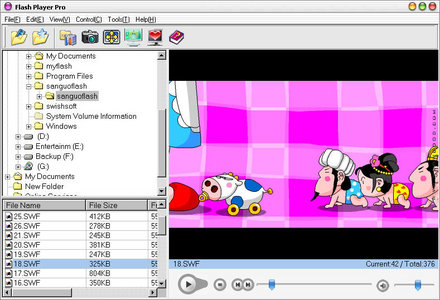
Flash Player Pro 3.8 Portable

Flash Player Pro is a handy flash tool kit designed as Adobe flash player and manager . It has several powerful flash tools: download flash movies from the Internet, preview and browse flash movie, capture flash image and set it as wallpaper, create flash screensaver with ease, make conversion between SWF and EXE flash movies etc. All of these features will help you enhance and extend the using possibility of existing flash files. And with friendly

user interface, Flash Player Pro offers you a fantastic animated flash world!

With Flash Player Pro you can:
- Download flash movies from the Internet
- Browse Adobe flash movies with built-in swf player.
- View or play flash movies with built-in player.
- View or play movies in full screen model.
- Make flash screensaver with a few mouse-click.
- Make flash screensaver installer and distribute it with ease.
- Capture flash movie image and save it.
- Capture flash movie image and set wallpaper.
- Build your own favorite folder, and browse flash movies in it.
- Make conversion between SWF and EXE flash movies.
- Copy or move flash movies to another folder.
- Rename flash movies.
- Connect with .swf file extension

What’s new Flash Player Pro Version 3.8 released:
- Change flash playing function
- Some minor tweaks

Flash Player Pro 3.8 Portable | 6.17 Mb
From Uploading or Letitbit

Apple Safari 3.2.1 Portable

Experience the web, Apple Style, with Safari - the fastest, easiest to use web browser in the world. With its simple, elegant interface, Safari gets out of your way and lets you enjoy the web - up to 2 times faster than Internet Explorer. Safari is a web browser developed by Apple Inc. and included in Mac OS X. It was first released as a public beta on January 7, 2003, and a final version was included as the default browser in Mac OS X v10.3. A beta version for Windows was released for the first time on June 11, 2007. Safari also runs on Wine, although the graphics do not display properly.

Safari has a bookmark management scheme that functions like the iTunes jukebox software, integrates Apple's QuickTime multimedia technology, and features a tabbed-browsing interface. A Google search box is a standard component of the Safari interface, as are software services that automatically fill out web forms, manage passwords via Keychain and spell check entries into web page text fields. The browser also includes an integrated pop-up ad blocker. An associated software from Apple is the Web Inspector - a DOM Inspector-like utility that lets users and developers browse the Document Object Model of a web page.

Features:
Blazing Performance
Elegant User Interface
Easy Bookmarks
Pop-up Blocking
Find
Tabbed Browsing
SnapBack
Forms AutoFill
Built-in RSS
Resizable Text Fields
Private Browsing
Security

Download Apple Safari 3.2.1 Portable | 31 MB

Avant Browser 11.7 Build 18 Portable

Avant Browser is a fast, stable, user-friendly, versatile the top rated multi-window browser in Internet, which adds a batch of features and functionalities to Internet Explorer. Avant Browser is a multi-window browser which features with many functions such as Pop-up Stopper and Flash Ads Filter, Built-in Google Searching, Built-in RSS/ATOM Reader, Safe Recovery, Integrated Cleaner and Advanced Browsing Options. Avant Browser is available in 41 languages.

* Online Profile Storage: Avant Browser can save users’ bookmarks, RSS Feeds, configurations or web passwords etc, in Avant online storage. In this way, users can access their personal data from anywhere, office, home or an Internet cafe, and don’t need to worry about losing those data when re-install windows.
* AutoFills: Help users to memorize web passwords, and fill passwords for users with one click.
* Flash Animation Filter: More than 85% of all flash animations on web pages are advertising. These flash files are pretty large, and normally take up to 90% of the size of the page you’re visiting.
* With Avant Browser you can save the bandwidth by blocking the download of these flash files with just one easy click. Avant Browser also provides options to block downloads of pictures, videos, sounds and ActiveX components. With these options users can control their bandwidth and speed up page loading.
* Built-in AD/Pop-up Blocker: Easily eliminate unwanted AD banners and pop-up pages automatically with just one click.
* Built-in RSS/ATOM Reader: Avant Browser has a built-in RSS/ATOM Reader, which allows you to read RSS/ATOM feeds just like browsing web pages. And you can also keep your favorite feeds as bookmarks.
* Additional Mouse Functions: If you click a link in the web page with the middle mouse button, the link will be opened in a new window in the background. This feature is extremely useful for opening posts in forums.

Avant Browser also comes with customizable Mouse Gestures, with which you can easily navigate the browser by moving the mouse.
* Multi-Window Browsing: Browse multiple web pages simultaneously. All opened pages can be easily stopped, refreshed, closed or arranged with one click.
• Real Full Screen Mode and Alternative Full Desktop mode: When you enable Full Screen Mode, all you see is the webspace, with no toolbars or other clutter. They are simply autohidden! Move your mouse over the top or bottom and find the toolbar and tab bar respectively. Avant Browser also provides

Full Desktop Mode, which is the same as Full screen mode, but differs in that your windows task bar stays visible.
• Built-in Search Engine: Avant Browser provides a built-in search engines. Built-in search engines enable user to search for web pages, images, groups, directories, news, lyrics and software in Internet.
• Full IE Compatibility: Avant Browser comes with all Internet Explorer functions, including Cookies, ActiveX Controls, Java Script, Real player and Macromedia Flash. IE bookmarks are automatically imported into Avant Browser.
• Control Your Privacy: With Avant Browser, you can easily keep your privacy by deleting all browsing traces such as: Typed Addresses, Auto-Complete Passwords, Cookies, History of Visited Web Sites, Temporary Internet Files and Search Keywords.
• Safe Recovery: If Avant Browser is closed improperly, all open web pages are saved and will be automatically reopened at next startup.
• Customizable Skins: Express your creativity by making a skin for Avant using a custom, easy to use program called Avant Browser Skin Maker, or use any of the many and varied skins made by other users.

Download Avant Browser 11.7 Build 18 Portable

Google Chrome 2.0.156.1 Portable

Google Chrome is a browser that combines a minimal design with sophisticated technology to make the web faster, safer, and easier. It has one box for everything: Type in the address bar and get suggestions for both search and web pages. Will give you thumbnails of your top sites; Access your favorite pages instantly with lightning speed from any new tab.

Google Chrome is an open source web browser developed by Google. Its software architecture was engineered from scratch (using components from other open source software including WebKit and Mozilla Firefox) to cater for the changing needs of users and acknowledging that today most web sites aren’t web pages but web applications. Design goals include stability, speed, security and a clean, simple and efficient user interface.

Download Google Chrome 2.0.156.1 Portable | 15 Mb

Invisible Browsing v6.7

Invisible Browsing suits both less experienced users and advanced users, through his manual or automatic mode. The manual mode allows you make all the settings, to choose the proxy and test it, while in the automatic mode all you have to do is a simple click on the button and you will surf anonymously. Invisible Browsing will hide, change or mask your IP address, letting you surf anonymously preventing your IP or other information to be collected without your permission. Invisible Browsing allows you to change your IP anytime by routing your Internet traffic through overseas servers.

All proxies are tested in advanced providing a high speed anonymous Internet connection. Premium proxies are high quality proxies that will never slow down your Internet connection. Proxies followed by the tag "supports POST" allow dynamic Internet browsing and posting messages on various forums, message boards or vote in polls. Invisible Browsing is an efficient Internet Explorer Privacy Solution erasing automatically and in real time, all your online tracks.

Download Invisible Browsing v6.7

Google Video Player 1.0.3.3 Portable

Google Video Player makes it simple to watch videos from the Google Video Search service. The player enables you to watch videos downloaded from Google Video (files with gvi and gvp extensions) on your desktop, browse scenes within a video using thumbnails, skip to anywhere in the video, view videos in full screen mode, and resume video downloads automatically, among other features.

The Portable Google Video Player does not require installation. You can carry this app on a removable drive and play gvi and gvp files on any computer.

Google Video Player 1.0.3.3 Portable | 5.4 MB
via Easy-Share | LetItBit | Uploading

FlashGet 1.9.6.1073 Portable

FlashGet (formerly JetCar) is specifically designed to address two of the biggest problems when downloading files: Speed and management of downloaded files. If you've ever waited forever for your files to download from a slow connection, or been cut off mid-way through a download - or just can't keep track of your ever-growing downloads - FlashGet is for you. FlashGet can split downloaded files into sections, downloading each section simultaneously, for an increase in downloading speed from 100% to 500%. This, coupled with FlashGet's powerful and easy-to-use management features, helps you take control of your downloads like never before.

FlashGet displays download progress in ranks of glittering dots, but its acceleration is not as pronounced as most. Its inability to start a download without confirmation makes for slow starts. We ran into difficulty locating configuration settings, a problem aggravated by a help system that apparently belongs to an earlier version. Nonetheless, the software managed and categorized our sample downloads efficiently. FlashGet supports over 30 languages!

• Speed: FlashGet can automatically split files into sections or splits, and download each split simultaneously. Multiple connections are opened to each file, and the result is the the most efficient exploitation of the bandwidth available. Whatever your connection, FlashGet makes sure all of the bandwidth is utilized. Difficult, slow downloads that normally take ages are handled with ease. Download times are drastically reduced.

• Management: FlashGet is capable of creating unlimited numbers of categories for your files. Download jobs can be placed in specifically-named categories for quick and easy access. The powerful and easy-to-use management features in FlashGet help you take control of your downloads easily.

FlashGet Highlights:
- Speed. The ability to split files into up to 10 parts, with each part downloading simultaneously. Up to 8 different simultaneous download jobs. FlashGet just might be the fastest download software around!
- Organize. Categorize files with FlashGet's integrated & simple-yet-powerful file management features before your files engulf you!
- Mirror search. Automatically search for the fastest server available for the fastest possible downloads.
- Automatically have FlashGet dial up, hang up & shut down the computer when you're not around!
- Schedule to download files whenever you feel! Whether it's while you snooze or during off-peak periods, certain times each weekday, weekend or whatever. The choice is yours!
- Manage your copious downloaded files with FlashGet's simple yet powerful user interface. Automate your FlashGet downloads with a browser click! Supports Internet Explorer, Netscape and Opera* web browsers. *with freely downloadable plug-in.
- Superior ease-of-use. FlashGet's interface is logical, integrated, informative and customizable. Queue your downloads with FlashGet's logical queuing system.
- Control the download speed limit so that downloading files doesn't interfere with your web browsing!
- Easily see any aspect of your downloads at a glance. Whether it be server status messages, monitoring splits, amount downloaded, time left...whatever! No excessive clicking into multiple open windows to see what's going on!
- Customize the the FlashGet toolbar and user interface, including the Graph and log window colors. Support for proxy servers for maximum downloading flexibility.
- Speak your language with FlashGet's auto-select language capabilities (20+ selectable languages available).
- Check for FlashGet updates from within FlashGet.
- Monitor your download progress, server status messages and download splits graphically with the easiest, most functional user interface around!
- BT. BitTorrent files download support!
- Vista. Compatible with Vista
+ much, much more!

Download FlashGet 1.9.6.1073 Portable | 4.5 MB
via Uploadbox | Uploading | EasyShare

Offline Browser 5.3.2932 SR1 Portable

Portable Offline Browser is an offline browser / web sites downloader. It can be installed to a Flash/USB drive and run directly from it. You can plug the drive with the installed Portable Offline Browser into any Windows system and use it with no need to adjust settings. All your Projects and downloaded files will be there! And when you unplug, none of your personal data is left behind.

Portable Offline Browser lets you take the web site with you when you travel with your laptop computer. When the flight attendants ask everybody to disconnect from the Internet, you still have your web sites on your hard drive. Even if the online content moves or changes, your files are still intact. You can even save streaming audio and video files to your hard disk, and play them back at the highest quality. And its powerful export feature allows you to share and transfer files, or burn them to CD in normal or Autorun mode. Best of all, the downloaded web sites can be viewed on Windows, Macintosh, and Linux computers.

Download Offline Browser 5.3.2932 SR1 Portable | 6795 KB

Skype™ 4.0.0.145 Portable

Skype 4.0 redesigned interface may also get you blinking. Compared with its stable cousin, the new Skype GUI has overflowed its banks, replacing tabs in the once-narrow interface with a second pane tacked on to the right. Four or five functions are flattened into this single window in an effort to make communications other than the voice chat staple easier to find and use. To wit, there's an IM bar deposited at the bottom of the communications pane and large buttons that prompt voice and video calls. Video calls are large by default, filling the program's communication activity pane.

Skype Out, the service offering competitive international rates for Skype users calling contacts' landlines instead of their computers, has also been chiseled out, by a large call-to-action button on the navigation bar. The button just below it opens a directory for finding people, businesses, and chat rooms. The toggle bar tucked away at the top switches from saved chat conversations to the contacts view, and rounds out the new additions.

Skype Prime
Some functionality, like Skype Prime, will arrive in later builds.
(Credit: CNET Networks)

Still more to come
Though there may be a placeholder for it, not every function in this first is live. The shop for Skype-approved hardware, while available from Skype.com, will not be activated in this iteration, nor will be the service on real-time advice, called Skype Prime. Automatic redial, call transferring, video presentations, and integration with Outlook contacts are also scheduled for roll-out in later builds.

The spread-out interface of Skype 4.0 for Windows will definitely take some getting used to, especially as it abandons the client's traditionally nimble, IM-styled build. However, it does succeed in calling out a wider array of communication services. This may give the Luxembourg-headquartered company a chance to deemphasize VoIP as its core competency and mark out new territory in Internet video, collaboration tools, and entertainment services.

As ambitious as Skype's new look and capabilities are, Mike Bartlett, the program's Windows product manager, confessed during our briefing that this design and the newly introduced features will be closely monitored for user backlash. It's likely that strong feedback from Skype's 309 million registered users will leave an impression on Skype 4.0 continues to take shape in the upcoming months.

Download Skype™ 4.0.0.145 Portable

Yahoo Messenger 10 Final

Yahoo Messenger is a free service that allows you to see when friends come online and to send them instant messages. It also can alert you to new e-mail in your Yahoo Mail or Yahoo Personals accounts, or when you have upcoming events recorded in your Yahoo Calendar. Yahoo Messenger offers firewall support, a standby mode that minimizes the program until an Internet connection is made, the ability to save and print your conversations, and a tabbed interface that provides quick access to your favorite stocks, news, and sports scores.

Other features include the ability to create a chat room automatically, stock price alerts, the ability to send messages to friends (even if they're not online when you are), a Quick Compact mode that hides the Messenger tools to maximize your viewing area, Messenger Themes, and voice chat, which allows you to talk for free to anybody else on the Internet. It also includes Launchcast Radio, Yahoo Games, and Yahoo Audibles. Using a Webcam, you can see who you're chatting with or view the Webcam of any Yahoo member who has granted you access.

Download Yahoo Messenger 10 Final New | 11 MB
from Uploading.com (Only these country please :US, DE, ES, UK, FR, RU, UA IT, CA, NL, AT, CZ)
or Depositfiles (Only these country please :US, RU)
or Easyshare (Other Countries....)

Video Avatar Maker v.2.3.0.53 Portable

Video Avatar is a tool for creating GIF avatars, userpics and signatures. You can the video file and its part and then crop it for your avatar, userpic or signature. So Video Avatar is a video cropper. By using Video Avatar you can create original video avatars for your blogs, journals, you can also set userpic in your profile page for any forums, communities, your website, etc.

Video Avatar supports all the video formats for inputing, such as avi, asf, mp4, mpg, mpeg, mov, wmv. Output file will be controlled with width, height, Frames Per Second and reverse mode. So you choose a video file, such as your favourite movie, music video, cartoon or any video you have, choose a part for cropping in the video preview and manage range bar for time limits and click Start. After converting you will got an animated GIF with pixelsize that is set. Video Avatar has a very simple and friendly-using interface, thats why you will not have any difficulties managing it.

Download Video Avatar Maker v.2.3.0.53 Portable

Wondershare WebVideo Author 1.1.6.10 Portable

Wondershare WebVideo Author is your reliable choice of converting videos in various formats (avi,mpeg, mov,asf,wmv,rm,flv,) to flash movies. You may import existing videos to WebVideo Author, or capture your own video by Webcam or DV

Wondershare WebVideo Author enables users to convert videos to streaming Flash videos, by simply importing the clips, and exporting to flash movie (SWF), or Flash Video (FLV). Ideal for setting up a webcast, creating video presentation for web publishing, and developing visual learning content.

Features:
Wondershare WebVideo Author not only empowers you to convert videos to flash, but also enable you to organize video clips for your own video album, and create LMS-ready instructional videos.

Import Video
* - Import video files, supports up to 7 most popular video formats:
AVI, WMV, MOV, MPEG, ASF, RM, FLV
* - Record by Webcam or DV

Manage Video Resource
* - Work with video pane, you see the structure of video clips on video pane
* - Work with player pane, you can preview, cut off, take snapshots of video clips using player pane
* - Work with Story Board, WebVideo Author allows you intuitively organize video clips with Story board.
* - Resizing videos, you may crop, change the resolution or aspect ratio of video clips.
* - Adding effects, there are 5 video effects that you can add to video clips. They are Gray, Black and White, White and Black, Negative, Emboss and Old Film.
* - Changing video properties, you are allowed to change frame rate, bit rate and sample rate of video clips.

Export
* - Export as FLV
* - Export as SWF
* - Export for LMS (AICC/SCORM)
* - Adding author info
* - Customize player template

Download Wondershare WebVideo Author 1.1.6.10 Portable | 7.7 MB
from UploadBox or Uploading

SpeedConnect Internet Accelerator v7.5 Portable

Easy, Safe and Fast optimizer to speed up your internet connection.
Software to speed up your internet connection. You can use this network optimizer to speed up your Dial-Up Modem, DSL, Cable, Wireless and LAN internet connection. SpeedConnect can automatically work out the best way to squeeze that extra bit of speed out of your computer"s Internet connection.

SpeedConnect Internet Accelerator is a powerful Windows application designed to optimize and speed up your internet related activities including browsing, downloading, uploading, streaming, online gaming, sending and receiving email. Optimization is applied to several network related parameters, in order to prevent the data fragmentation and to improve the data throughput. All this translates into a faster internet connection: faster browsing, faster download, faster email and faster online gaming.

BENEFITS:
- FASTER internet connection
- Browse FASTER
- Send and receive e-mail FASTER
- Download and upload files FASTER
- Play online games FASTER
- Improve Skype connection
- NO adware, NO hardware installation
- NO service subscription, NO monthly fees
- NO new hardware installation

FEATURES:
- Optimizes all internet connection types
- User friendly
- Quick Optimizer option
- Advanced Customization
- Tool and Wizards
- Load/Save Settings
- Optimization Report
- Connection Analyzer

SpeedConnect Internet Accelerator For Windows® Vista™, XP, 2000.
IMPORTANT! SpeedConnect requires Microsoft .NET Framework 2.0!

Download SpeedConnect Internet Accelerator v7.5 Portable
password : 4shar1ng

Google Desktop 5.8.0808.21323 Portable


Google Desktop gives you easy access to information on your computer and from the web. It's a desktop search application that provides full text search over your email, computer files, music, photos, chats and web pages that you've viewed. By making your computer searchable, Google Desktop puts your information easily within your reach and frees you from having to manually organize your files, emails and bookmarks. It makes searching your computer as easy as searching the web with Google.

Google Desktop doesn't just help you search your computer; it also helps you gather new information from the web with Sidebar, a new desktop feature that shows you your new email, weather and stock information, personalized news and RSS/Atom feeds, and more. Sidebar is personalized automatically, without any manual configuration required (though you can certainly make your own customizations if you want to).

DownloadGoogle Desktop 5.8.0808.21323 Portable
Password: carnitech@crostuff.net